
Prerequisites
Before starting, have the following ready:- A checkout of this repository, including
package-lock.json,packages, andexamples. The Docker build uses the repository as its build context. - Familiarity with Serve a REST Endpoint and Watch It Run Live. Its checkout implementation and fake services are already included in the repository; you can run this example without creating those files yourself.
- Docker with its daemon running and Docker Compose v2 supporting
up --wait. Docker Desktop or a Docker Engine installation with the Compose plugin works. - Internet access for the first build to download container images and npm dependencies.
curl, a browser for the dashboard, and a Bash-compatible shell such as Bash or Zsh for the command examples. Windows users can run them in WSL.- Available local ports 3000, 3001, 4000, 5433, and 6380. Stop the previous tutorial’s API and monitor before starting, or use the alternative HTTP ports described in section 2.
docker info should connect to the daemon, and the Compose help should list --wait.
For the Docker-only route, Node.js, npm, PostgreSQL, and Redis run inside containers; no host installation is required. For the optional host workflow, also install Node.js 24 with npm and verify them with node --version and npm --version. That route still uses Docker for PostgreSQL and Redis.
1. Split the Responsibilities
Each API executes the whole checkout and waits before responding. The two processes share state through adapters; this example does not enqueue jobs or move individual steps between servers.
PostgreSQL owns execution persistence. Redis holds disposable lookup data and transports telemetry. Registering two storage adapters with
Step.useStorage would replace the first one, so we compose their methods explicitly.
2. Start the Local System
init-db service creates the PostgreSQL tables before either API starts; this avoids concurrent schema initialization. The monitor subscribes before the APIs become available.
These ports avoid the default database ports used by other repository examples. Stop the previous tutorial’s API and monitor first if they still occupy ports 3000 or 4000. Alternatively, prefix the startup command with
API_A_PORT=3100 API_B_PORT=3101 MONITOR_HOST_PORT=4100 and adjust curl/browser URLs accordingly. The database credentials are local demo values, and all published ports bind to loopback.
Check startup and open the dashboard:
api-a and api-b. API responses also include X-Instance-Id, so you can see which process handled each request.
3. Connect Both Adapters
Seeinfrastructure.ts for client setup and cleanup. Its storage adapter delegates checkpoints and context changes to PostgreSQL and cache operations to Redis:
writes starts as Promise.resolve(). The engine can dispatch checkpoint writes asynchronously, so this example serializes them and waits for the chain before acknowledging a successful checkout. If a checkpoint write fails, the chain remains rejected and subsequent successful workflows return an infrastructure error; fix storage and restart the API. Context auditing is best effort in the PostgreSQL adapter.
The example wraps the small Redis client interfaces to accommodate ioredis overloads. Only the Redis cache methods are used; workflow checkpoints never go to Redis. This composition intentionally does not expose durable-wait methods. For event-driven suspension and resumption, use the full PostgreSQL adapter and the durable waits guide.
Before the existing checkout steps, api.ts adds a read-only catalog lookup:
4. Create on A, Replay on B
201 Created, X-Instance-Id: api-a, and X-Workflow-Stack-Id. The body includes:
200 OK, X-Instance-Id: api-b, and X-Idempotent-Replay: true. The body and workflow stack ID match the first response. No checkout steps run for the replay, so the monitor contains one execution for that order.
One Execution, Even After Replay Through B
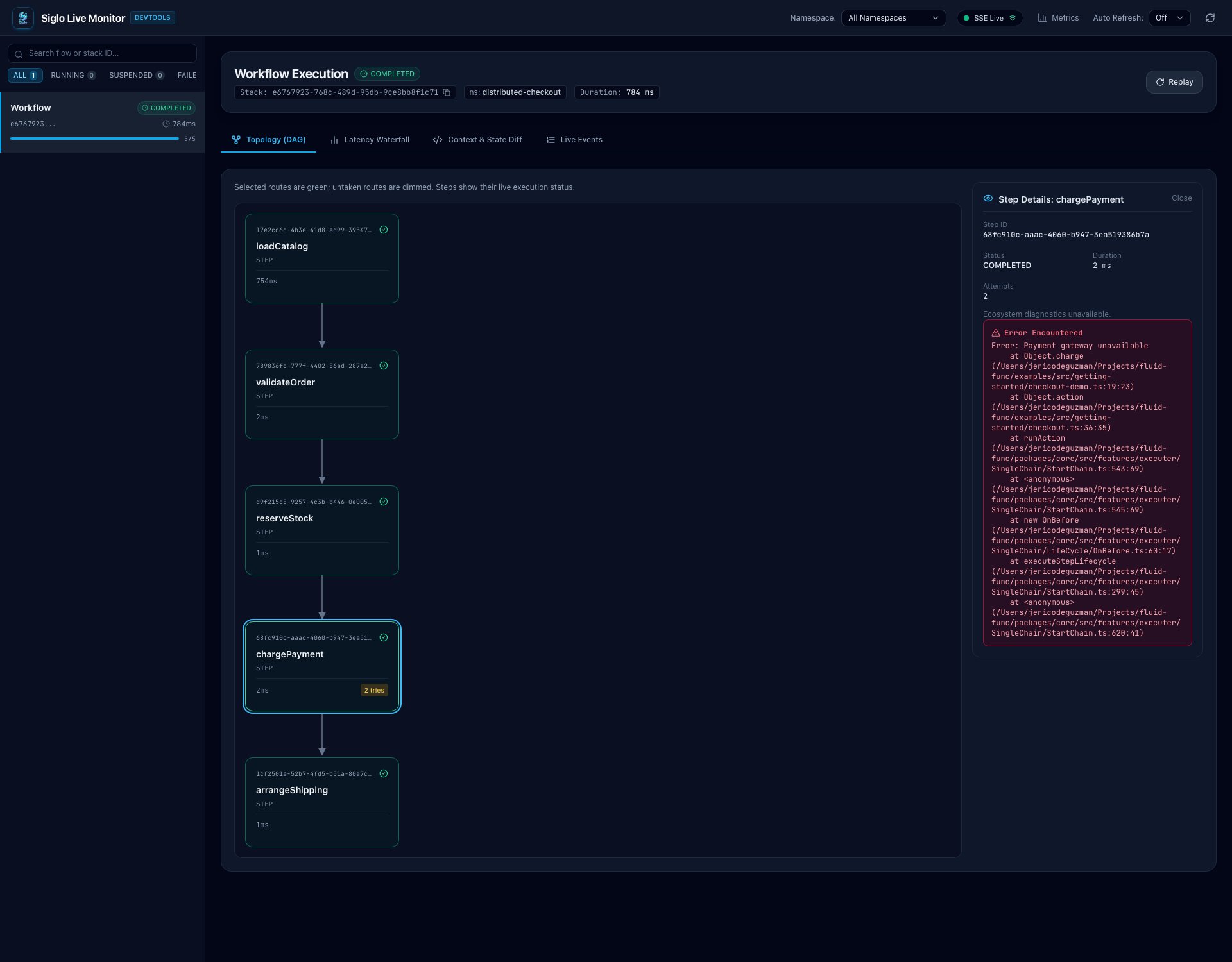
The screenshots in this tutorial were captured using the optional host workflow: separate API A, API B, and monitor processes sharing real PostgreSQL and Redis. Your execution IDs and timings will differ. API A created this checkout, and API B returned its saved response with the same stack ID. The dashboard still contains just one execution. All five steps completed; selectingchargePayment shows 2 attempts beside the graph. The retained gateway error records the first failed attempt, while COMPLETED confirms that its retry succeeded.
PostgresIdempotencyStore.claim using distributed-checkout:v1:<orderId>:
claimed: run the workflow, drain checkpoint writes, then save the public response withcomplete.in-progress: return409withRetry-After: 1; retry after the first request settles.completed: compare the input fingerprint and return the saved response. Reusing the order ID with different business fields returns409.
400 before claiming or executing anything. This route calls checkout.run directly so it can control claims, response replay, and persistence acknowledgment around the workflow.
Race the Two Replicas
Use a fresh order ID and SKU so the catalog pause is not cached:201; the overlapping request returns 409. If your requests arrive far enough apart, the second may instead return the completed replay (200). Either API can win. Change the IDs when repeating the experiment.
5. Observe Both Servers in One Dashboard
Each API publishes its workflow emitter over Redis:monitor.emitter. The subscriber does not share a connection with cache commands: Redis subscription mode requires its own connection.
Open http://127.0.0.1:4000 and select the execution using its stack ID. You will see loadCatalog followed by the previous tutorial’s checkout steps, including the payment retry. To create a second execution on B, repeat the request with a new order ID and the same coffee-kit SKU. Its lookup should reuse Redis’s cached label.
catalog lookup for coffee-kit. Both workflows still execute reservation, payment, and shipping.
Compare the Cold Lookup with the Shared Cache Hit
On the first request to API A, the latency waterfall makes the deliberately slowloadCatalog step stand out: its cold lookup takes roughly 750 ms. The payment row also shows two attempts.
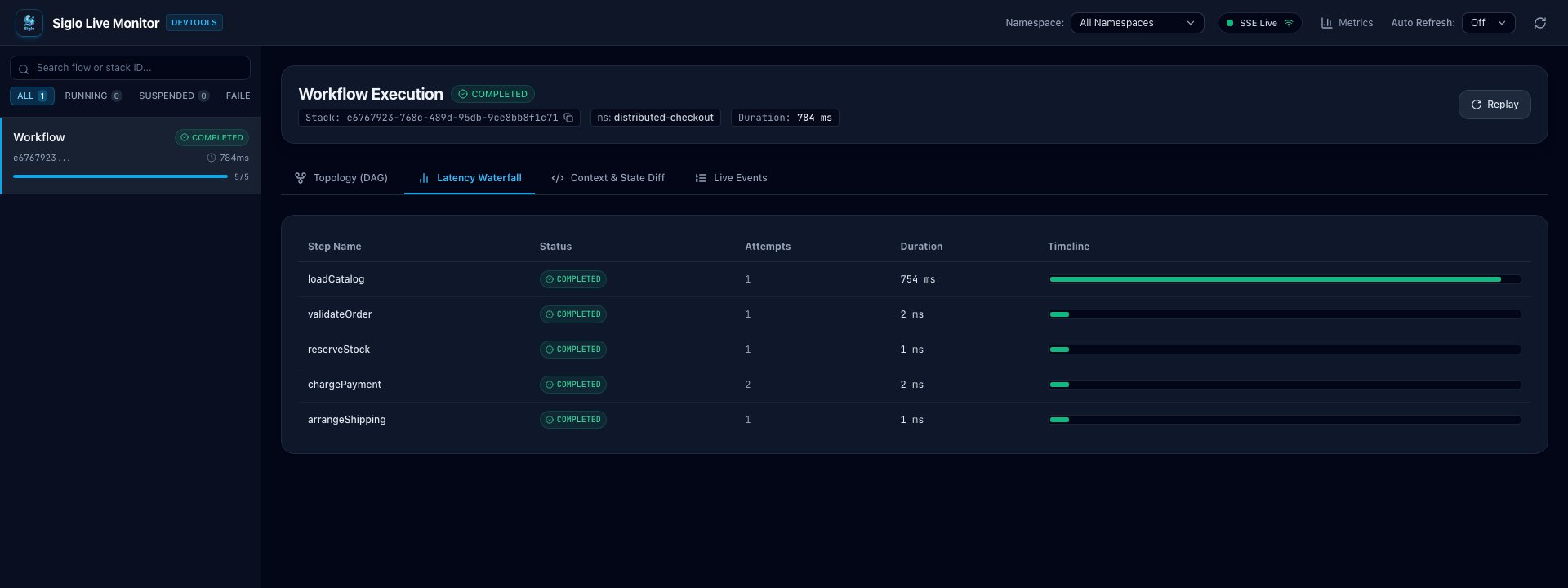
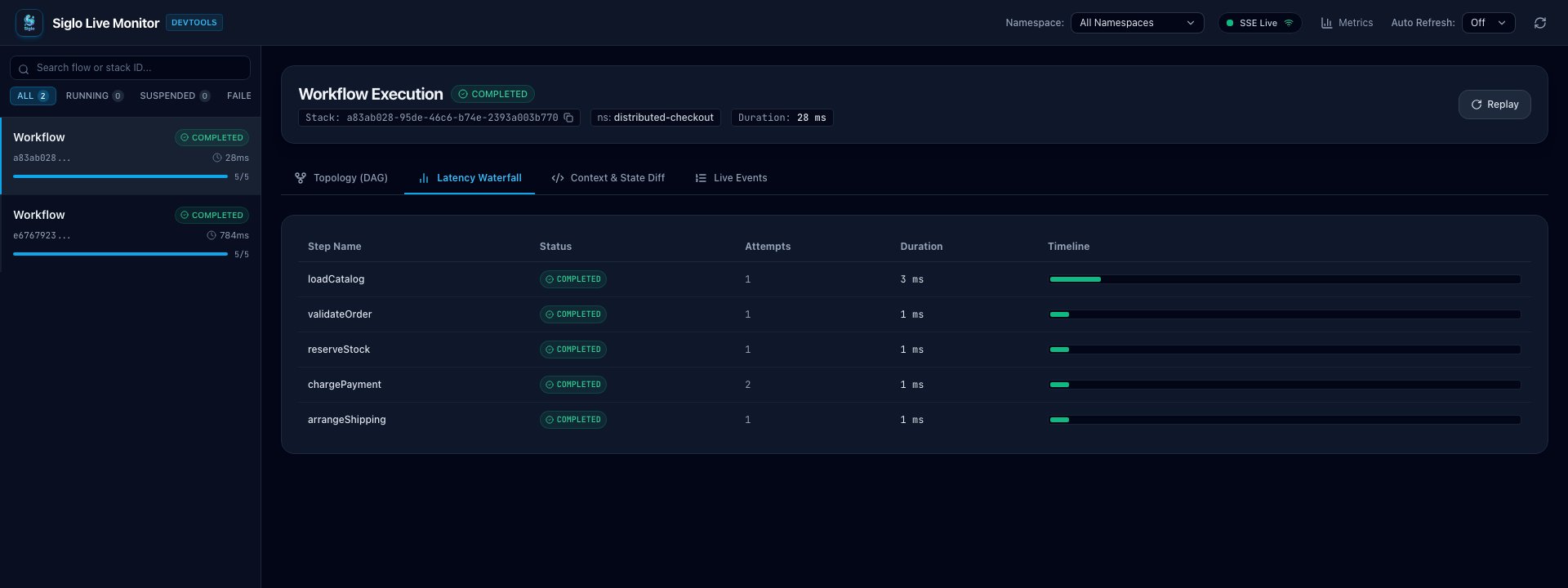
X-Instance-Id response header identifies which API handled each request; the monitor identifies executions by stack ID. The timing comparison shows a cache optimization, not a guarantee of identical timings on every machine.
Subscribe before sending another request to see new events from either API:
6. Verify Persistence and Failure Behavior
ReplaceSTACK_ID with the first response’s execution UUID. Either API can read its persisted status:
status: "completed". Restart API A and replay the original order through it:
/health responds again, the original POST still returns the saved response. PostgreSQL’s named volume preserves checkpoints and idempotency records across container restarts and down/up cycles.
Inspect the tables directly:
500 with a generic error. The central dashboard shows the failed run; B’s logs show refund followed by stock release. Because the fake services compensate on failure, this demo releases the failed claim to allow a new attempt. Successful business execution followed by a persistence failure instead returns 503 and retains the claim for reconciliation.
Inspect a Failure Without Leaving the Shared Monitor
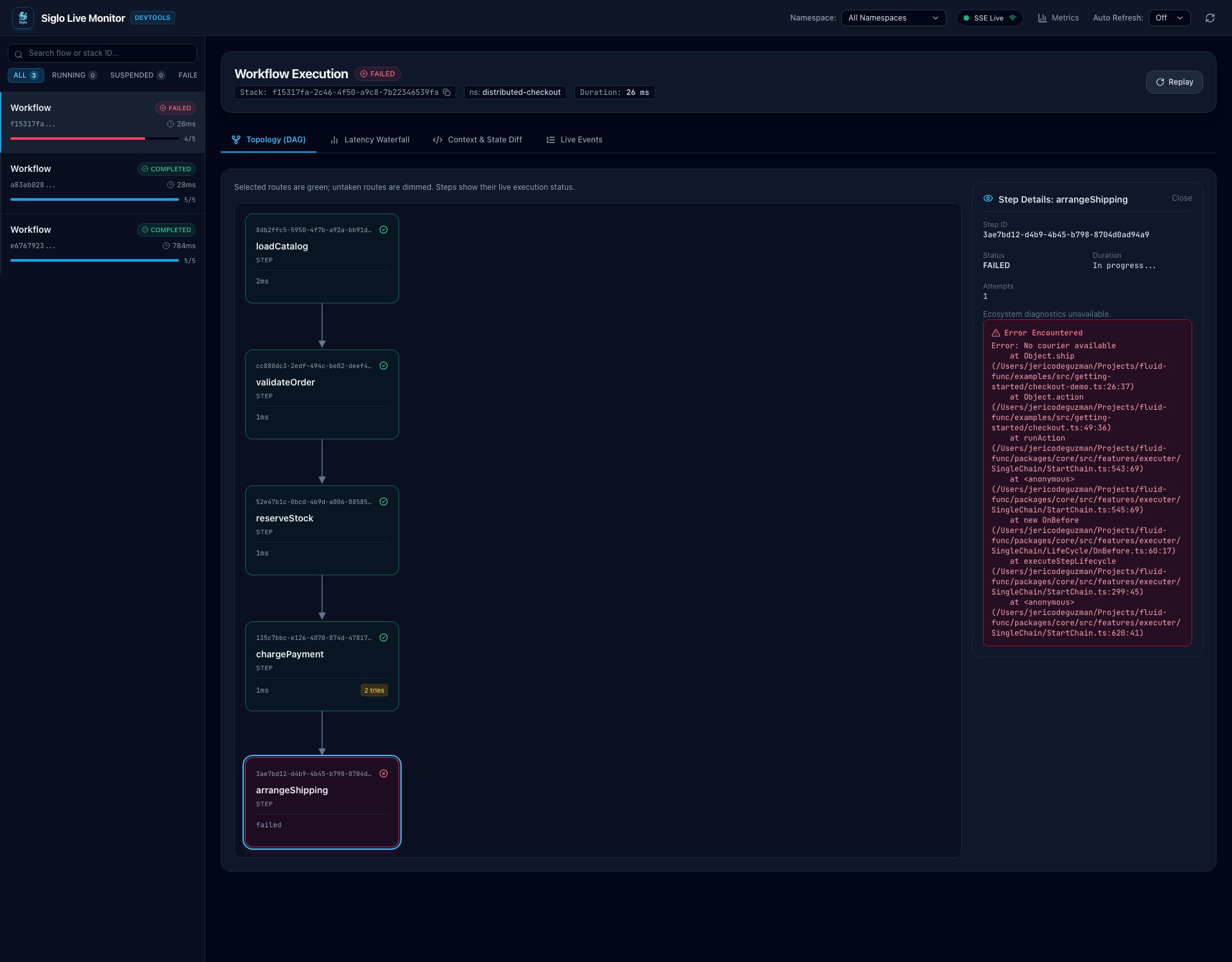
The failed checkout from B appears alongside the successful runs. Selecting the redarrangeShipping step opens No courier available and its stack trace on the right, while the graph keeps the completed preceding steps visible. Refund and stock release are confirmed in B’s service logs; they are not additional step nodes in this graph.
Run the Smoke Checks
With Compose running, execute the included verification script inside API A:7. Run Node Processes on the Host (Optional)
To edit the TypeScript without rebuilding containers, first stop the stack, then start only its databases:8. Understand the Recovery Boundary
This is a local distributed execution demo using fake business services. A PostgreSQL checkpoint does not automatically schedule recovery after a process dies. There is no background worker or recovery loop here; an interrupted claim stays in progress until its 24-hour TTL expires or an operator reconciles it. The TTL is a deduplication window, not a renewable lease with fencing. A paused process could outlive it, and provider side effects cannot be committed atomically with the saved HTTP response. Before handling real payments, add provider idempotency keys, bounded service calls and cancellation, reconciliation for ambiguous failures, and explicit recovery ownership. Do not infer exactly-once side effects from these claims. See Idempotency, Durable Workflows, and Compensation and Sagas. For production, replace fake services, removefailShipping, derive prices from trusted data, authenticate the API and monitor, and derive namespaces from trusted identity. The status endpoint exposes only stack ID and status; it still needs authorization in a real service. Configure database retention and monitor redaction. Redis cache loss only removes the lookup optimization; PostgreSQL remains the checkpoint and response store. API health endpoints report process readiness, not continuous dependency health.
Stop the local containers with:
--volumes to that command. Redis data is ephemeral in this setup.
Continue the tutorial with Suspend Checkout for Approval and Resume Across Servers to pause checkout at durable event waits, survive process restarts, and resume across replicas with webhooks.