
- Asynchronous payment gateways: 3D Secure verification, bank transfers, or payment redirects require waiting for an asynchronous webhook notification hours or days later.
- Human-in-the-loop approvals: High-value orders, risk exceptions, or manager sign-offs require an operator to inspect and approve the transaction.
- Cooling-off windows: Customers may have a 15-minute grace period to edit or cancel an order before the warehouse packs it (
wait('15m')).
setTimeout is fatal in distributed environments: client connections time out, server processes crash or restart during deployments, and in-memory state is lost.
This continuation extends the distributed checkout stack with durable workflows: an execution can suspend cleanly at waitForEvent or wait, persist its complete state and continuation point to PostgreSQL, release all process resources, survive server restarts, and resume safely on any API replica when an external webhook or human approval arrives.
Run the Ready-Made Example
You need a repository checkout, a running Docker daemon, and Docker Compose withup --wait. From the repository root, build and start the complete example without copying any tutorial snippets:
siglo-durable-checkout Compose project, image, database volume, Redis channel, and host ports. The previous tutorial and its examples/distributed-checkout stack can keep running unchanged.
Submit an order to API A. Expect 202 Accepted with
status: "waiting":
result.status: "confirmed". Repeating approval returns 409 Conflict. Every order in this demo requires approval. Reused submission IDs are rejected for 24 hours, so use a new order ID when repeating the walkthrough.
Run the automated smoke check, which restarts both API replicas between submission and resumption and also tests dashboard resumption:
down; add --volumes only when you want to reset this example’s database. The previous tutorial’s volume is separate.
Example Files to Explore
The stock, payment, and shipping services are fake; no external provider credentials are needed. After trying the example, edit these files and rerun the build command above. The sections below explain how they fit together.
1. How Durable Distributed Execution Works
When a workflow runs with{ durable: true } and reaches a wait node (waitForEvent or wait), the runtime:
- Suspends Execution: The step halts cleanly without blocking Node.js event loop threads.
- Persists Checkpoint: The engine writes an OCC versioned checkpoint containing the accumulated context and step history to
siglo_checkpoints. - Registers Wait Record: A durable wait descriptor is inserted into
siglo_wait_recordsindexed by a business correlation key (e.g.order:distributed-1001). - Returns Immediate Control: The workflow returns
{ status: "waiting", correlationKey, stackId }, enabling your API to respond immediately with202 Accepted. - Releases the Request: No HTTP connection or timer must stay open for the wait. The runtime may retain local state, but PostgreSQL holds the durable snapshot, so the API process can restart or deploy new code.
- Resumes Across Replicas: When an external webhook arrives at either API replica, calling
resumeWorkflowacquires a PostgreSQL advisory lock, claims the wait record atomically, restores the state snapshot, and executes the remaining steps to completion.
2. Define the Durable Checkout Workflow
The runnable demo reserves stock and charges the customer, then pauses every order for manager sign-off before shipping. A real checkout could apply an amount or risk rule before choosing an approval workflow. checkout-durable.ts uses the existing demo service interfaces:[!NOTE]waitForEventaccepts a string or a correlation key extractor(context) => string. Always correlate waits on immutable business identifiers (such asorder:${order.orderId}orpayment:${paymentIntentId}) rather than random request tokens to ensure idempotency.
3. Wire PostgreSQL Wait Records in Storage
In Distributed Checkout with PostgreSQL and Redis, our storage adapter only forwarded checkpoints and cache operations. For durable workflows, the storage adapter must expose wait record persistence and distributed locking. infrastructure.ts serializes checkpoint and wait writes and exposesflush(). The submission wrapper drains these writes before acknowledging 202; the resume path drains them while holding the workflow lock. Compose runs schema initialization once before starting the API replicas and monitor:
PostgreSQL Wait Records Schema
ThePostgresStorageAdapter automatically manages the siglo_wait_records table:
4. Implement the API and Webhook Endpoints
api-durable.ts provides submission and approval endpoints, plus health and checkpoint status routes:POST /api/checkouts: uses@siglo/expresswith{ durable: true }and returns202 Acceptedwhen suspended or200 OKwhen completed.POST /api/webhooks/orders/:orderId/approval: accepts approval webhooks and callsresumeWorkflow.
202 for a waiting result or 200 on completion. No custom output callback is needed. The approval webhook calls resumeWorkflow directly because it continues an existing execution rather than starting a new one.
5. Walkthrough: Suspend on A, Resume on B
Let’s test durable suspension across server restarts and replicas.Step 1: Submit an Order to API A
Send a checkout request to API A on port 3100:202 Accepted:
- Inventory has been reserved.
- Payment has been authorized.
- The workflow has suspended at
awaitApproval. - No HTTP request or in-process timer needs to remain open for this order; the durable state is in PostgreSQL.
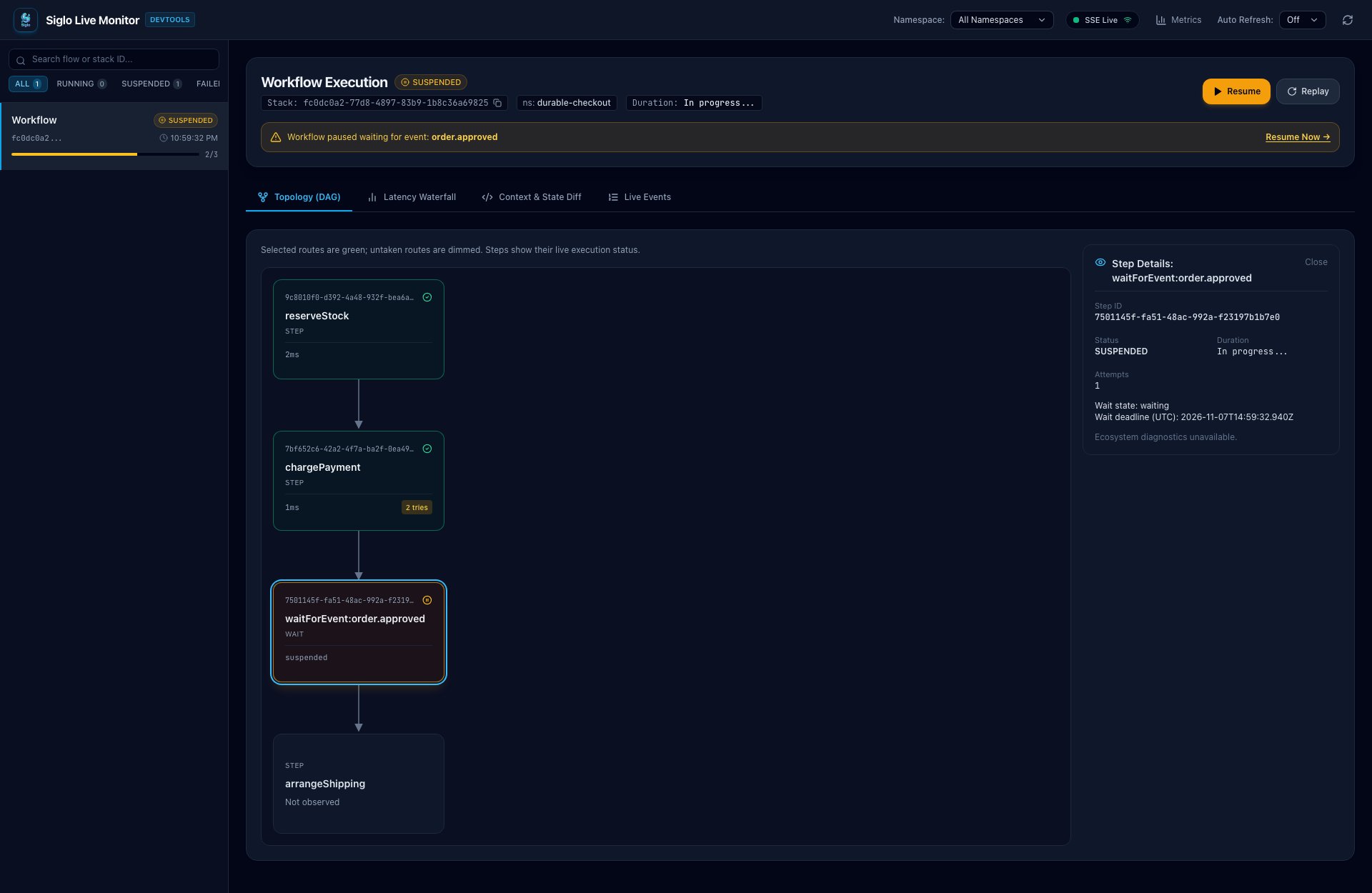
reserveStock and chargePayment are complete, the approval wait is amber, and arrangeShipping has not run. Selecting the wait opens its waiting state and UTC deadline in the right-hand details panel.
These screenshots were captured from separate local API and monitor processes using this example’s real PostgreSQL and Redis services. Execution IDs, deadlines, and timings will differ in your run.
Step 2: Inspect PostgreSQL State
Verify the wait record directly in PostgreSQL:Step 3: Simulate Process Crash & Restart
Restart API A to demonstrate complete crash survival:Step 4: Resume on API B
Deliver the approval webhook to API B on port 3101:arrangeShipping, and returns 200 OK:
status: RESUMED with the claimant ID recorded. The checkpoint has status: completed.
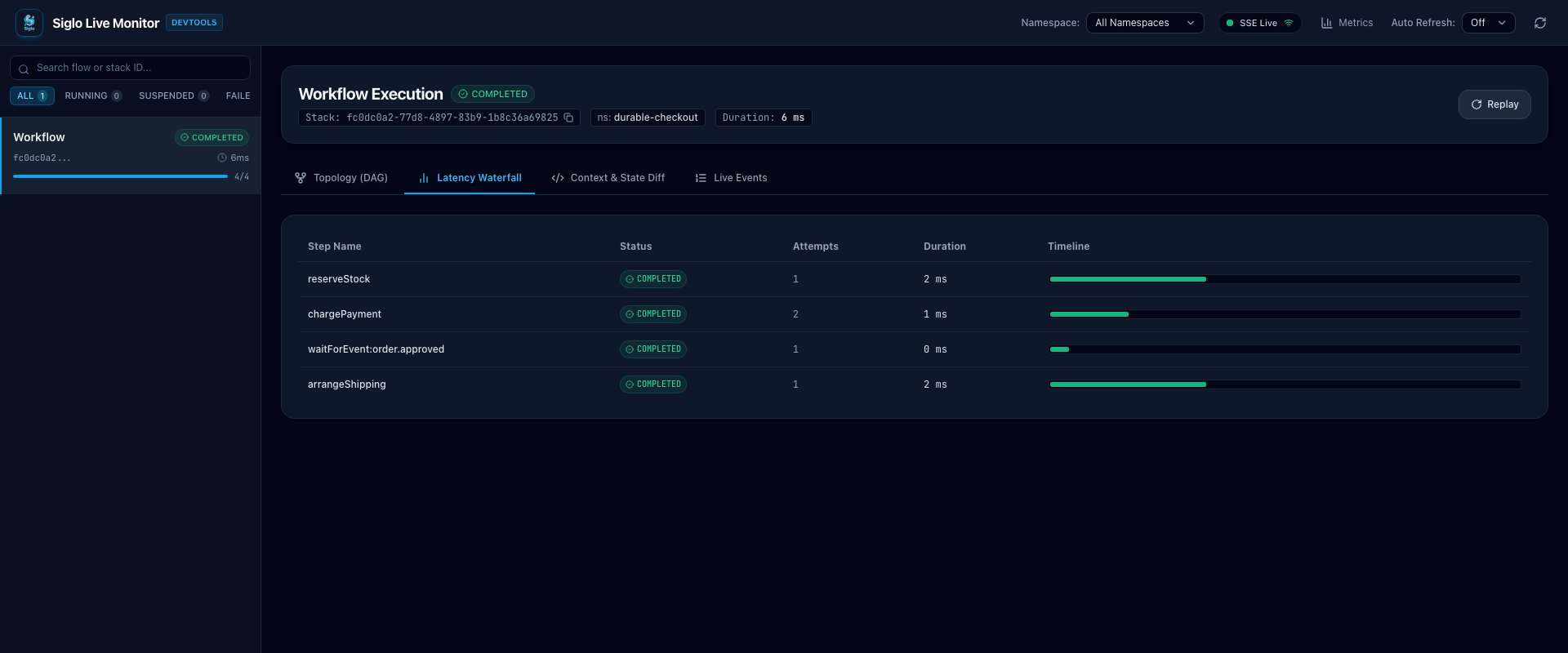
The same execution now displays COMPLETED in the shared monitor. In this capture, both API processes were restarted before API B received approval. The latency view retains the earlier reservation and payment steps, marks the wait complete, and shows the subsequent arrangeShipping execution under the original stack ID. Its step timings do not represent the time spent awaiting human approval.
Step 5: Test Duplicate Delivery Protection
Send the exact same approval webhook again to API B:409 Conflict:
[!IMPORTANT] Siglo uses PostgreSQL advisory locks and atomic conditional updates (WHERE status = 'WAITING') insideclaimWaitRecord. If two identical webhooks arrive concurrently at API A and API B, exactly one replica acquires the claim; the other is rejected withDuplicateEventException, preventing duplicate shipping dispatches.
6. Live Monitoring and Interactive Resumption
As in Serve a REST Endpoint and Watch It Run Live, a separate dashboard observes checkout execution. This example uses port 4100 to avoid the previous tutorial’s monitor port. The monitor registers the checkout workflow and connects to the same PostgreSQL storage as both API replicas. Unlike the previous tutorial’s observation-only monitor, this local dashboard enables interactive resumption:- Open http://127.0.0.1:4100 in your browser.
- Select the execution by its
stackId. - The DAG highlights
reserveStockandchargePaymentin green (COMPLETED). - The run displays an amber SUSPENDED badge and the waiting event name
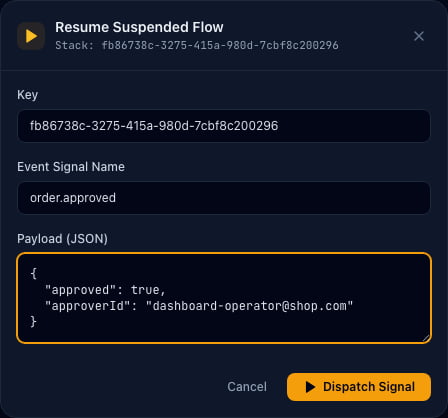
order.approved. - Click Resume and use the waiting run’s stack ID as the key.
- Enter the JSON event payload:
- Click Dispatch Signal. The dashboard dispatches
POST /api/workflows/:stackId/resume, and the live DAG immediately transitions:arrangeShippingexecutes on screen and the workflow completes.
Approve Directly from the Dashboard
Use a fresh submitted order to try this route after the webhook walkthrough. The Resume dialog pre-fills the selected stack ID andorder.approved signal. Replace the default JSON with the approval payload above before dispatching it.
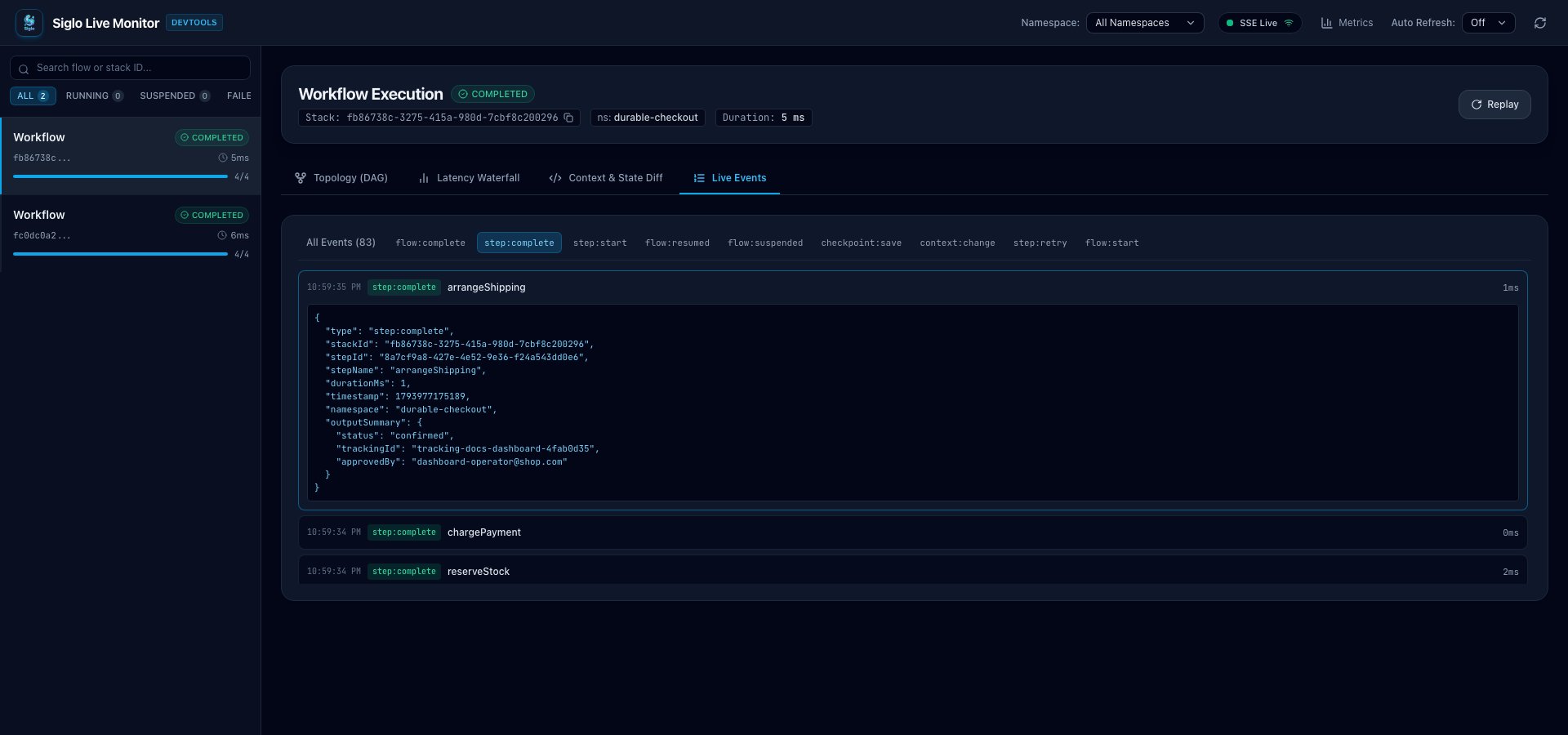
step:complete, and expand arrangeShipping. The captured completion event contains status: "confirmed", the tracking ID, and approvedBy: "[email protected]". The run is COMPLETED, and the original webhook-resumed checkout remains visible alongside it.
7. Rejections, Timeouts, and Saga Rollbacks
What happens if the reviewer rejects the order, or the 24-hour approval window expires?Scenario A: Order Rejected by Reviewer
First submit another order withorderId: "order-5002" using the checkout endpoint. Then send an approval payload with approved: false:
- The workflow resumes at
arrangeShipping. arrangeShippingseesorder.approved !== trueand explicitly refunds and releases the persisted provider IDs before throwingApprovalRejectedError.- This cleanup runs in reverse business-operation order:
refund(paymentId)is called.release(reservationId)is called.
- The fake services have refunded the payment and released stock. The API returns
422for rejection. Because a fresh process does not reconstruct earlier compensation handlers, the example performs this post-resume cleanup explicitly. Production provider operations must be idempotent for recovery attempts.
arrangeShipping fails because that signal rejected the order. The run turns red while earlier completed operations remain visible. Refund and stock release are explicit service calls inside the continuation, not separate nodes in this view.
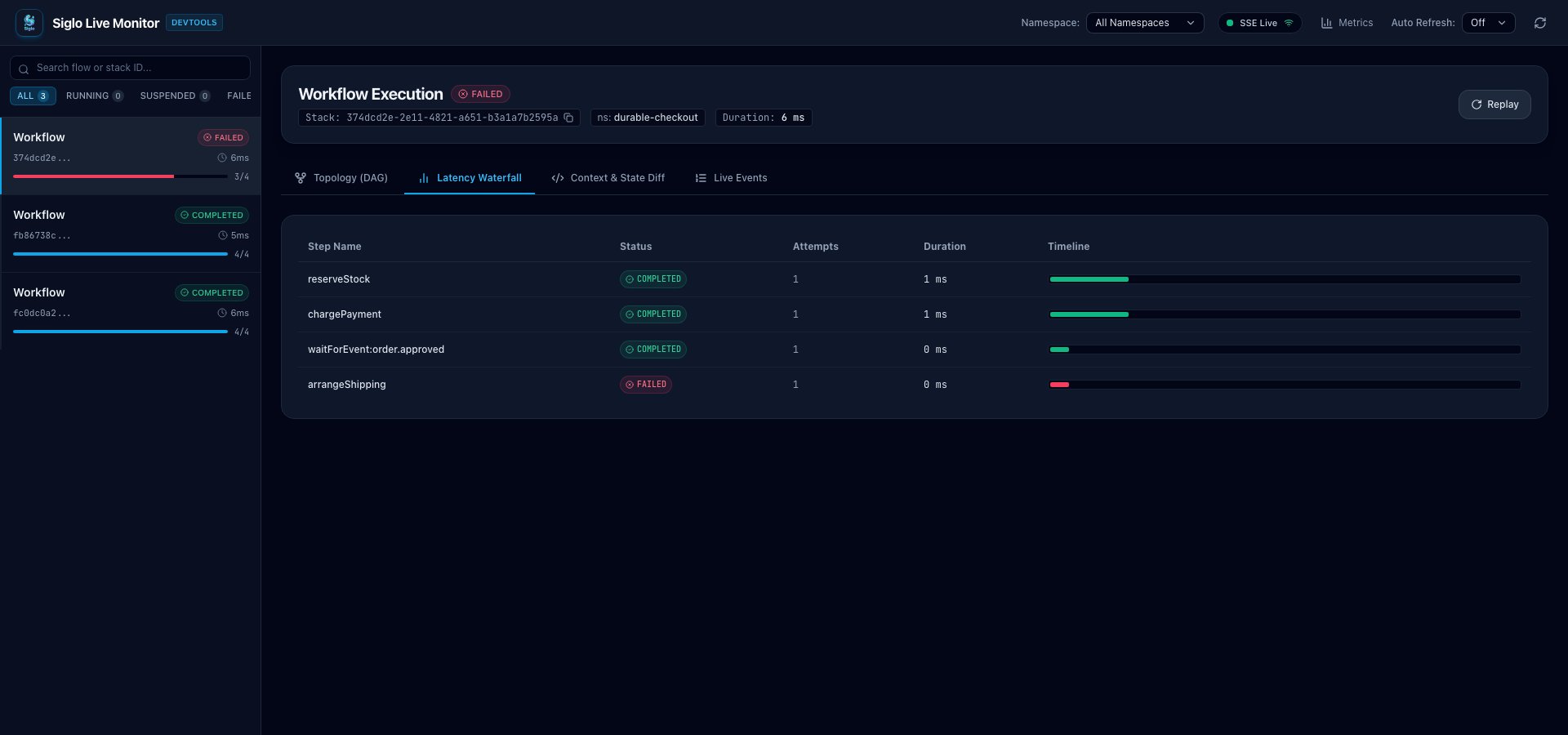
Scenario B: SLA Expiration
If no approval webhook is received beforetimeout: '24h' elapses:
- Any late resume attempt triggers
ExpiredWaitException. - The runnable example returns
410 Gonefor a late approval. - The demo does not run an expiration sweeper. Production systems need a scheduled reconciliation job to expire abandoned orders and refund or release their persisted provider IDs; declaring a timeout alone does not perform that cleanup.
8. Workflow Versioning and In-Flight Migrations
Long-running workflows that wait days or weeks for external signals often outlive software deployments. What happens if your team refactors the checkout workflow while 200 orders are suspended in PostgreSQL? Siglo provides declarative version migrations via.version() and migrations:
9. Deterministic Testing with @siglo/testing
Durable workflows should be tested deterministically without waiting 24 hours or starting real database containers.
Use @siglo/testing with createWorkflowHarness to test approval without waiting for the timeout:
10. Operational Best Practices
When operating durable workflows in production:- Correlation Key Uniqueness & Scoping: Prefix correlation keys with domain namespaces (e.g.,
checkout:v1:${orderId}). Never correlate on mutable user attributes. - PostgreSQL Connection Sizing: Each
resumeWorkflowinvocation briefly uses a PostgreSQL connection for advisory locking and OCC verification. Maintain a dedicated pool for durable state distinct from transactional business logic. - Sweeping Expired Waits:
waitForEvent({ timeout })setsexpires_atin the database. Schedule a periodic job (SELECT * FROM siglo_wait_records WHERE status = 'WAITING' AND expires_at < NOW()) via@siglo/scheduleror cron to reconcile abandoned orders. - Interactive Dashboard Security: Remote resumption via the DevTools UI (
allowRemoteResume) is intended for local staging and debug environments. Restrict access usingauth.adminKeyand network policies in production.