
@siglo/kafka to start a Siglo workflow for each Kafka record. Two consumer replicas share @siglo/postgres idempotency, and a Redis-backed live monitor shows the workflow’s routing decisions:
branchselects a path for placed orders, cancellation requests, or unsupported event types.whenwith an else path sends high-value orders to review and ordinary orders to fulfillment.whenwithout an else path adds gift wrapping only when requested.
review-required outcome records a decision; it does not suspend a durable workflow. The previous tutorial remains the example for persisted waits and cross-server resumption.
The integration point in worker.ts is createKafkaMessageHandler from @siglo/kafka. Once the workflow and KafkaJS consumer are defined and the consumer is connected and subscribed:
@siglo/kafka prepares its input and runs the Siglo workflow; branch and when select the workflow’s path. The runnable worker also configures the adapter’s validation, PostgreSQL deduplication, heartbeats, retries, cancellation, and dead-letter callback. Section 3 shows that wiring with its imports.
Run the Example
You need a repository checkout, a running Docker daemon, and Docker Compose supportingup --wait. From the repository root:
siglo-kafka-order-routing project uses its own image, Kafka and PostgreSQL volumes, Redis channel, database, and host ports. The earlier checkout examples can keep running.
Publish a gift order using the producer in worker A’s container:
handledBy may be worker-a or worker-b. Both /results endpoints read the same PostgreSQL table. executions counts visits to the workflow’s final persistence step; ordinary duplicate delivery should leave it at one.
Try the other paths by changing the publisher’s scenario argument:
Run the smoke check, including restarting both workers and replaying an already completed business event:
down. Add --volumes only to reset this example’s data.
Example Files to Explore
1. How Kafka and Siglo Fit Together
For each record:- KafkaJS delivers the topic, partition, record, and heartbeat callback to
eachMessage. - The adapter claims the event in PostgreSQL within its consumer-group and tenant scope.
- The input mapper parses JSON and adds the tenant from the Kafka header. Validation runs before any workflow step.
- Siglo selects a branch and executes the chosen steps within that worker process.
- The workflow saves its outcome, and the adapter completes the claim. KafkaJS can then advance the consumer group’s offsets.
reserveStock to one server and shipOrder to another. Each selected workflow runs on the consumer handling its record.
The order ID is the Kafka key, keeping an entity’s events in the same partition under a stable partitioning configuration. Different event IDs for that order still represent different work.
2. Define the Event and Its Routing Rules
The publisher sends JSON like this, withevent-id and x-namespace headers:
tenant: "shop-demo" from the header. workflow.ts validates identifiers, positive integer amounts for placed orders, and the optional boolean flag.
Use branch to Choose an Event Handler
After defining the named steps and subflows, the workflow’s outer structure is:
branch evaluates the selector once and executes the matching target. Each target can be a step or a composed flow. Its output merges into the context available to saveOutcome.
The fallback is deliberate. An unknown event should not silently reach saveOutcome as if fulfillment succeeded. rejectUnsupported throws an application error derived from SigloError with retryable: false; the worker’s retry predicate sends it directly to quarantine after one workflow attempt.
This fallback differs from invalid JSON or a missing required field: those are rejected before the workflow starts.
Use when for a Business Decision
The placed-order route selects between review and fulfillment:
queueReview, producing review-required. It does not reserve inventory, charge a payment, or ship. An ordinary order executes the fulfillment flow instead.
The demo records the review decision and completes processing of that Kafka record. To wait for approval, model a separate approval event or follow the persisted-wait design in the durable checkout tutorial. A returned review status alone does not register a durable wait.
Use when Without an Else for an Optional Step
The fulfillment path contains another condition:
wrapGift adds giftWrapped: true and appends its action. Otherwise that target is skipped and execution continues to shipOrder. Prior results remain in the workflow context.
The same pattern can add an audit, notification, or optional enrichment without duplicating the rest of a flow. Keep irreversible external actions idempotent because retries restart the selected workflow.
3. Connect @siglo/kafka to @siglo/postgres
The initializer creates the topics, outcome tables, and PostgresIdempotencyStore table once before either worker starts. Both workers connect to that same database and use the same consumer group.
The key adapter options in worker.ts are:
idempotencyStore.ensureTable() before the workers start. The complete worker.ts also connects a producer for dead-letter publication, attaches monitoring, and wires shutdown to shutdown.abort().
The event header provides business-event deduplication across offsets. The adapter automatically scopes that identity by
groupId and x-namespace, so independent groups and tenants do not suppress one another’s work.
The Kafka key has a different purpose: orderId chooses the partition. Using that entity key for deduplication would incorrectly suppress a later cancellation event for the same order.
If you omit the custom idempotencyKey, the adapter deduplicates by topic, partition, and offset. That handles redelivery of one record, but a second published record with a new offset is a distinct event.
4. Walk Through the Decisions in the Live Monitor
Open http://127.0.0.1:4300 before publishing. Worker events travel through their own Redis channel to this monitor process. The workers set the same emitter as both the root flow’s monitor and the default monitor, so nested branch targets also report their named steps. Try one scenario at a time:order.placed route, the fulfillment path, and the absent wrapGift action. For the review order, inspect queueReview and confirm that payment and shipping did not execute. Use the gift scenario to compare the optional step’s true path.
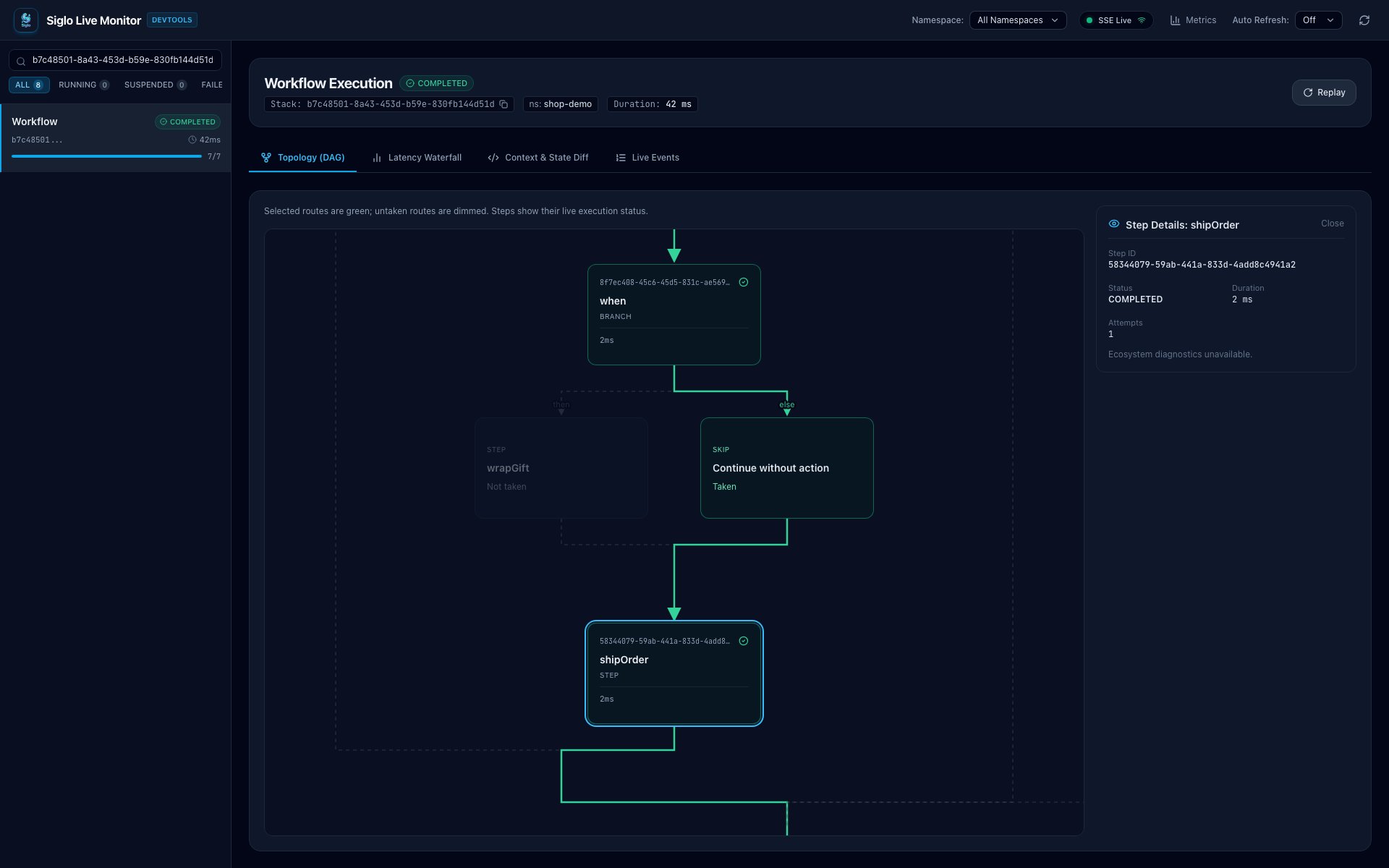
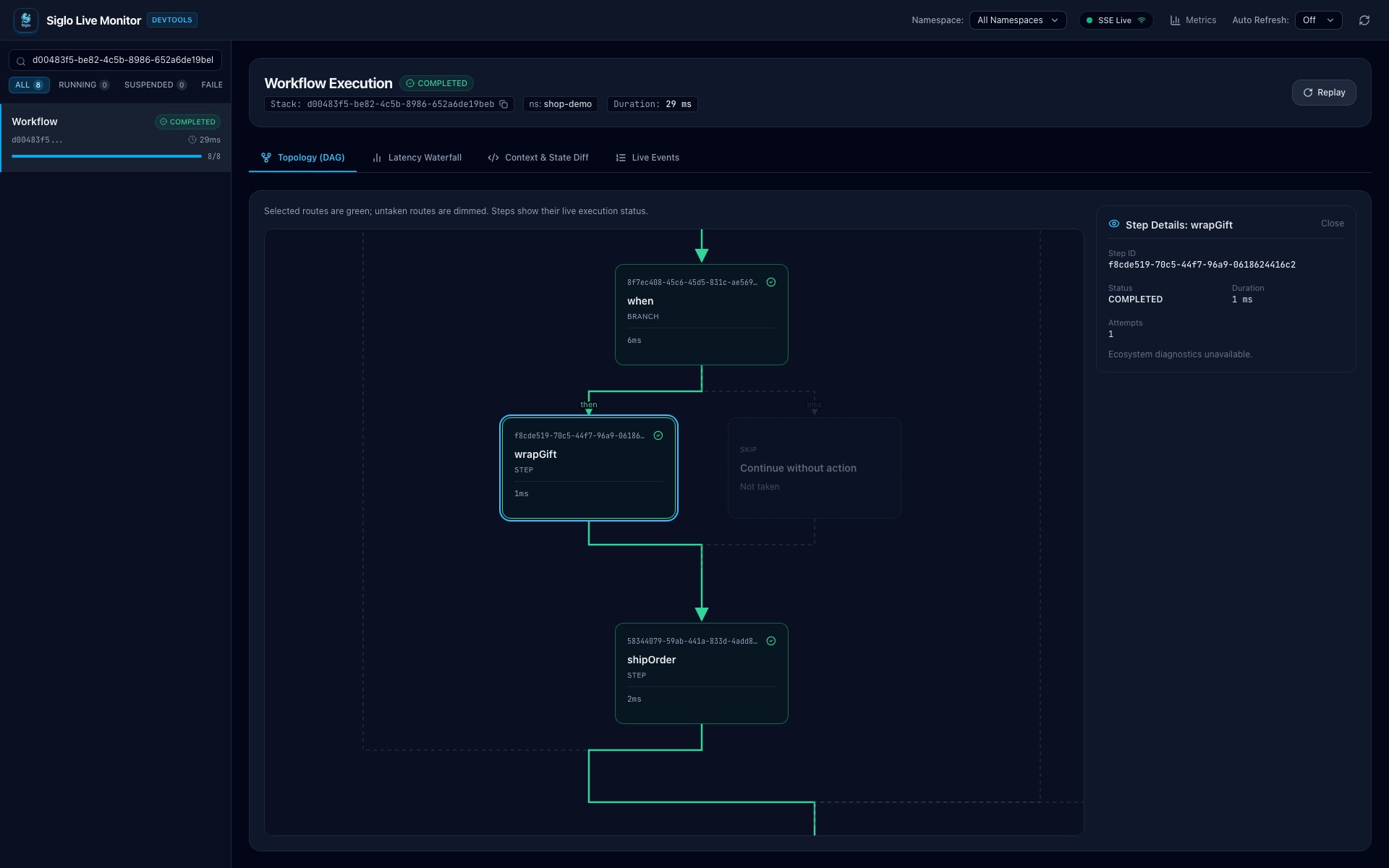
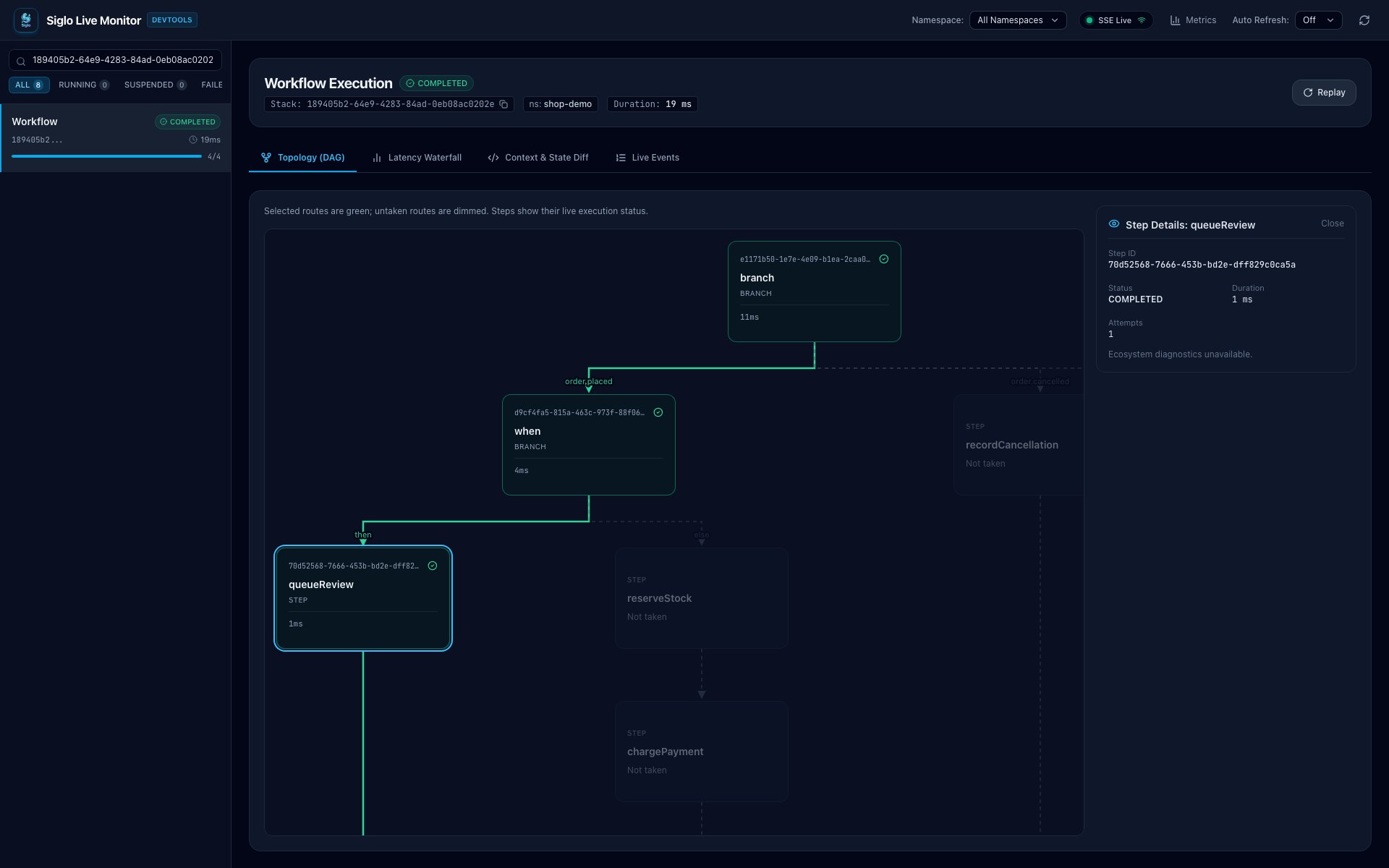
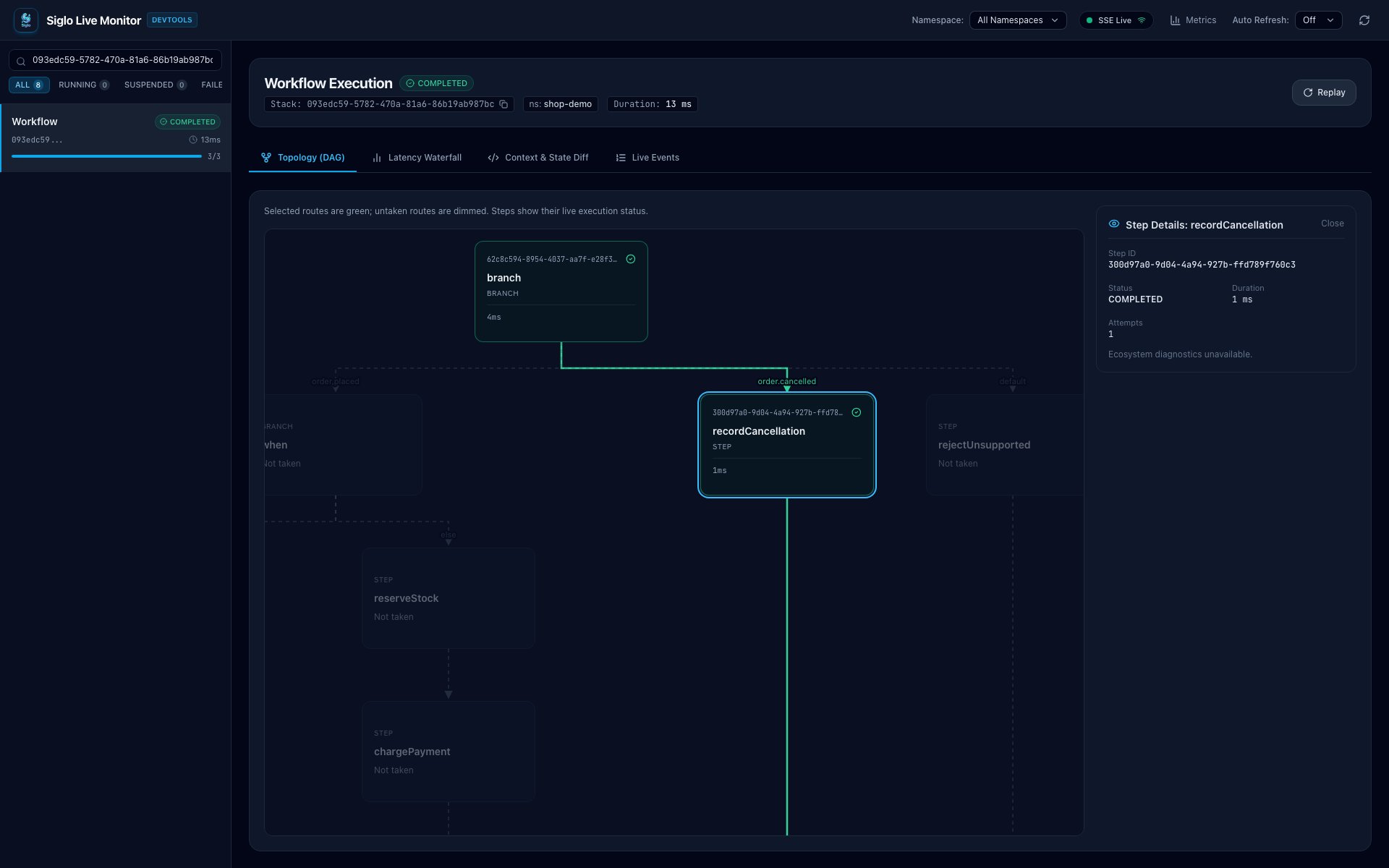
The monitor’s graph shows the complete workflow definition: labeled branch routes and when then/else paths, including the skip path. Selected routes are green and untaken routes are dimmed; a false when without an else action highlights “Continue without action” before continuing to the next step. Conditional routes reconnect directly without an extra join card. Executed steps display their live status and timing. Click an executed step for its details. The same view shows parallel fan-out and fan-in, race joins labeled “First result,” and map item processing templates.
These screenshots show real events processed by the Docker example through Kafka, the workers, PostgreSQL, and Redis. Each view focuses on the relevant decision, with the selected step’s details visible on the right. Execution IDs and timings will differ on your machine.
Standard: Skip Gift Wrapping and Ship
The optionalwhen takes its green else path through Continue without action to shipOrder. The dimmed wrapGift step is marked Not taken, while the details panel confirms that shipping completed.
Gift: Take the Optional Step
WithgiftWrap: true, the same decision takes the green then path through wrapGift before shipping. Selecting wrapGift keeps its status, duration, and attempt count beside the graph.
Review: Route a High-Value Order Away from Fulfillment
Theorder.placed route reaches the first when, which selects queueReview. Payment and shipping remain on the dimmed, untaken fulfillment path. This run completes with review-required; it is not suspended for approval.
Cancel: Choose a Different Event Branch
Anorder.cancelled event goes directly to recordCancellation. The placed-order decision tree stays dimmed because none of its fulfillment steps run.
actions array provides a simple, persisted record of the demo path. Graph connections describe possible control flow, not proof that every route ran. This example enables observation but disables remote resumption; it has no suspended runs to resume. Rebuild the Compose image after updating the monitor UI or runtime so workers and the dashboard use the updated graph metadata.
Kafka offsets and PostgreSQL claims survive worker restarts. The monitor’s run history is held in memory, and Redis Pub/Sub does not replay old monitoring events after a monitor restart.
5. Replay an Event After Both Consumers Restart
Publish a standard order with explicit event and order IDs:replay-1001 appears in /results. Restart both consumers, then publish the same business event again:
executions stays at one.
Now publish a distinct cancellation event for the same entity:
6. Unsupported Events, Invalid Input, and Dead Letters
Try both failure paths:deadLetter callback awaits publication to tutorial.orders.dead-letter, then saves a local audit row. Only after that callback succeeds does the adapter consider the failed record handled. If publication or audit persistence fails, processing rejects and Kafka may redeliver the record.
Inspect the real dead-letter topic with Kafka’s console consumer:
attempts: 1 and one malformed-JSON record with attempts: 0. On a reused stack, the command can also show earlier dead letters.
The unsupported event creates a failed workflow run in the monitor even though its Kafka record is later quarantined successfully. Malformed JSON does not create a workflow run because parsing fails first.
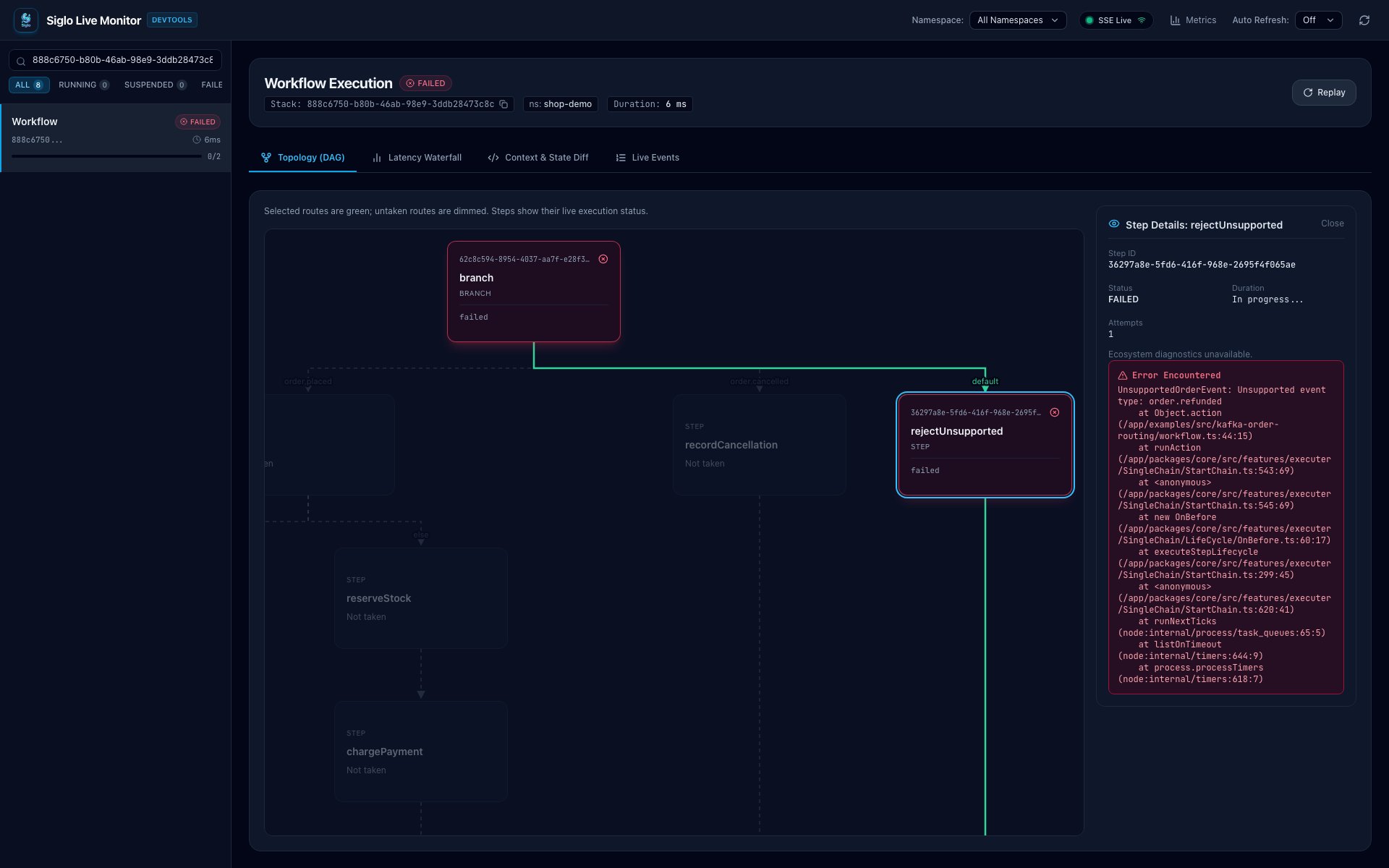
Unsupported: Inspect the Failed Fallback
The greendefault connection identifies the selected route; the red rejectUnsupported step and failed run status identify its outcome. Its details panel shows UnsupportedOrderEvent: Unsupported event type: order.refunded. Selecting a route does not mean that its action succeeded.
Invalid: Rejected Before a Workflow Exists
Theinvalid scenario sends malformed JSON. There is no DAG or step-details screenshot for this case: the adapter rejects the record before starting the workflow, so the monitor’s run count does not increase. Inspect /dead-letters or tutorial.orders.dead-letter instead; the record has attempts: 0. This differs from the unsupported event above, whose workflow starts and fails with attempts: 1.
7. Test the Tutorial
After installing repository dependencies and building@siglo/core, run the routing tests without Docker:
saveOutcome.
With the stack running:
8. What This Example Guarantees
- Records within a partition are processed in order by KafkaJS; different partitions can run concurrently. The group distributes partitions, so events are not assigned to workers in round-robin event order.
- Each chosen flow runs in-process. Worker failure restarts record processing; this adapter does not resume a partially completed workflow checkpoint.
- Completed claims can skip repeated business-event IDs across replicas. Claims are separate from business database writes and external provider effects; they do not make those effects atomic.
- The 10-second processing budget fits within the 60-second claim budget. The adapter cancels before claim expiry and retains uncertain claims after cancellation. External clients still need to honor cancellation and deduplicate effects.
- An accepted Kafka send is not proof that the workflow has completed. Inspect the persisted result, monitor, or another application-level completion channel.
- A dead-letter send and claim completion are separate writes. A crash between them can publish a duplicate dead letter; its stable
recordIdis available for downstream deduplication.
executions field is a demo audit counter, not an exactly-once business-effects mechanism. For database changes that must reliably publish follow-up Kafka events, use an application transaction and an outbox. Built-in outbox support and a separate tutorial are recorded for later.
For producer-to-consumer traces and provisioned Grafana metrics using a separate APM example with the same routing model, continue with Zero-Code APM Dashboards.
Continue with the Kafka adapter reference, branching and parallelism guide, or the durable checkout tutorial when an event path needs a persisted wait.
To authenticate the HTTP producers feeding an order stream, continue with Accept Asymmetrically Signed Orders, using @siglo/crypto and @siglo/express in an independent example.